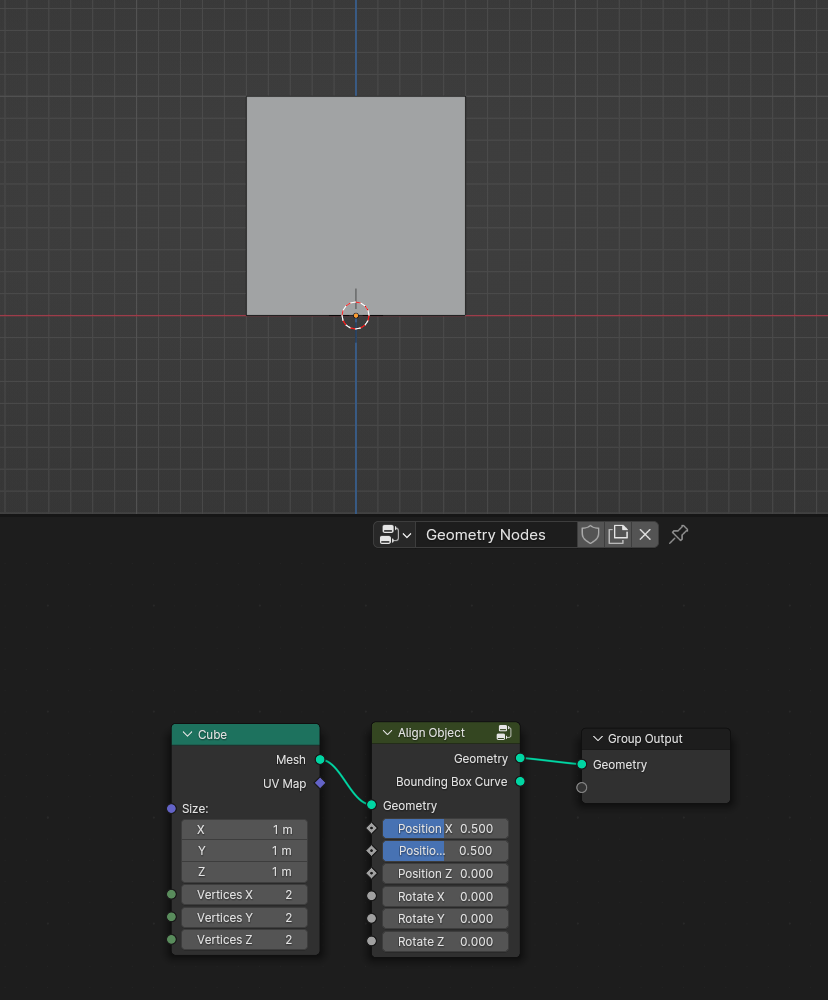
Align Object

The node has 2 modes, object alignment by bounding box and vector alignment.

Settings

Geometry Mode
in geometry mode, the model is aligned based on the bounding box,

Position X/Y/Z – alignment of positions.
Rotation X/Y/Z is an easy way to rotate along the axis, where the number 1 is 90 degrees.

Vector Mode
Vector alignment only works with instances and when. It is important that your model has a rotation value of 0 degrees in all axes. Otherwise, the alignment will not be correct.

X/Y/Z axis – is the alignment axis.
Factor – Degree of alignment, a lower value makes the alignment smoother.
Mix Rotate – is the mixing between turning (rotation socket) and align.
Secondary axis – is an additional axis for alignment. It is set by a vector and is not calculated based on motion.

How to use

Vector mode

Align geometry